How to Set Up Claude Code the Right Way (So It Stops Making Messes)
Most people blame Claude Code when it makes bad decisions. The real problem is almost always setup.
Claude Code is only as good as the context you give it. No structure means no guardrails. No guardrails means the model makes judgment calls you didn't authorize. That's how you end up with a full file rewrite when you asked for one line to change.
This is the exact Claude Code setup I use on every project. It takes about 30 minutes the first time and saves hours every week.
What Is CLAUDE.md and Why Does It Matter
CLAUDE.md is a plain text file you place at the root of your repository. Claude Code reads it automatically at the start of every session. It's the closest thing to a persistent briefing document the model has. By default, Claude Code has limited memory between sessions. CLAUDE.md is the most reliable way to ensure it has the right context.
Without CLAUDE.md, every session starts from scratch. The model doesn't know your stack, your conventions, what it's allowed to change, or what will break the app if touched wrong. You're essentially handing a contractor a key and walking away without a brief. I once asked it to update a button label and got back a completely rewritten page component.
A good CLAUDE.md covers four things:
- Who you are and how you communicate
- Your tech stack
- Your repo structure
- Your danger zones
That's it. Keep it short. Clarity beats size.
Define Your Danger Zones First
Before anything else, identify the files and directories in your project that should never be modified without explicit permission. For most web apps, this means database migration files, authentication logic, payment webhook handlers, and middleware.
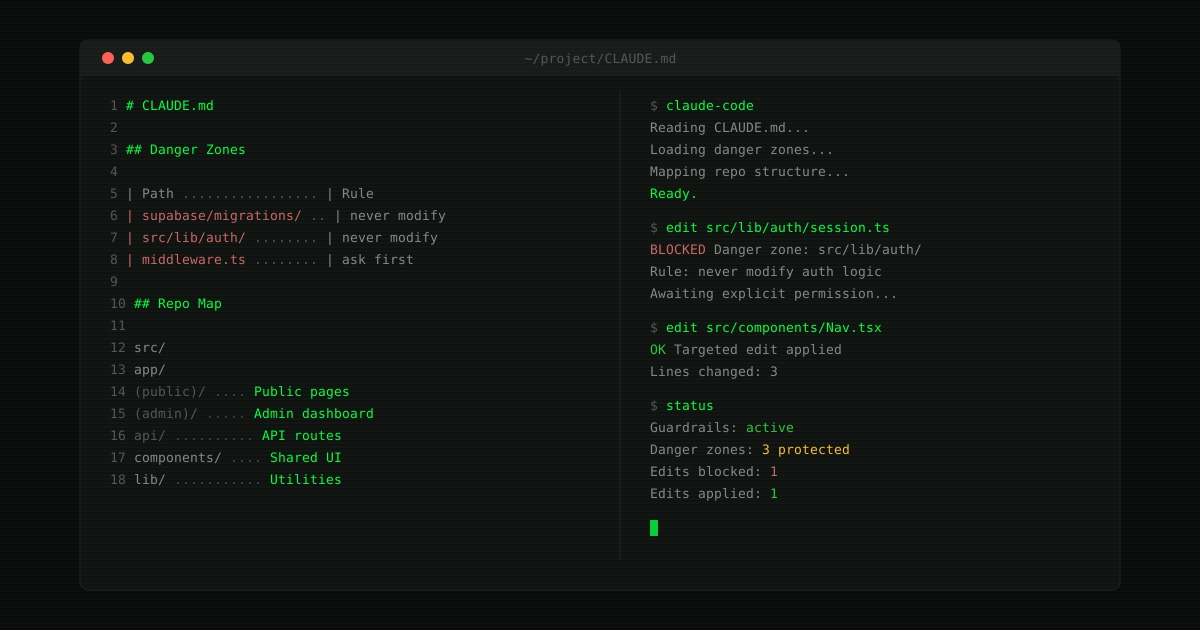
In my CLAUDE.md, I keep a table called Danger Zones. Two columns: path on the left, rule on the right. Claude Code sees that table and knows to stop and confirm before touching anything on the list.
Here's what mine looks like for a Next.js + Supabase project:
| Path | Rule |
|---|---|
| supabase/migrations/ | Never modify without explicit permission |
| src/lib/auth/ | Never modify auth logic |
| middleware.ts | Never modify without explicit permission |
| main branch | Use PRs for larger changes |
Five minutes to set up. Potentially saves you from a catastrophic migration error at the worst possible time. If you want a real-world example of what happens when guardrails are missing at scale, the Pentagon's forced removal of Claude is a case study in what vendor lock-in costs when there's no fallback plan.
Migrations are the scariest item on that list. They run in sequence, each one building on the last, and a bad one can't be cleanly rolled back without risking data loss.
Add a Current Repo Map
Claude Code navigates your codebase using pattern recognition plus the context you provide. A repo map tells it where things live before it starts looking, so it's not burning context tokens figuring out your folder structure.
Mine is a simple directory tree with a one-line label per folder:
src/
  app/
    (public)/    → Public-facing pages
    (admin)/     → Admin dashboard
    api/         → API route handlers
  components/    → Shared UI components
  lib/           → Utility functions
  types/         → TypeScript types
Update this whenever the structure changes. If it's stale, it's worse than nothing. The one failure mode is letting the map drift. I update mine every time I add a route group or restructure a directory. This map becomes even more valuable if you're working remotely. I use Claude Code Channels to push code from my phone, and the repo map is what keeps those sessions accurate without a full IDE open.
Enforce Targeted Edits Only
This rule goes directly in CLAUDE.md. Here's why it matters:
Without it, I'd write something like: "Update the copy on the submit button." Claude Code would return a full rewrite of the page component. New imports, reorganized JSX, things I never asked for.
With the rule in place, I write: "Update only the button label on line 42. Do not touch anything else in this file." Three words change. Nothing else moves. That's the difference between a usable tool and a liability.
Set Your Communication Rules
Claude Code adapts to how you want to work. I include a short communication section in every CLAUDE.md:
- No em dashes
- Concise prose over bullets
- Ask before acting on anything ambiguous
- Never install new dependencies without confirming
Small things, but they add up over a session. You stop correcting the model and start shipping.
Repository structure for Claude Code
The repo map above is a summary. Here is the full repository structure I use for a Next.js + Supabase project with Claude Code:
.
├── CLAUDE.md              # Persistent briefing for Claude Code
├── CLAUDE.local.md        # Personal preferences (gitignored)
├── .claude/
│   ├── skills/            # Reusable skill definitions
│   └── agents/            # Custom agent configurations
├── src/
│   ├── app/
│   │   ├── (public)/      # Public routes: /, /blog, /about, /contact
│   │   ├── (admin)/       # Authenticated admin routes
│   │   └── api/           # API route handlers and webhooks
│   ├── components/        # Shared UI components
│   ├── lib/               # Utilities, Supabase clients, config
│   └── types/             # TypeScript type definitions
├── supabase/
│   └── migrations/        # Database migrations (danger zone)
└── docs/                  # Voice guides, conventions, specs
Every folder has a single responsibility. Route groups separate public pages from admin pages at the file system level, which means Claude Code never accidentally edits an admin component when working on a public page. The .claude/ directory holds skills and agents that persist across sessions.
The key insight is that this structure is not just for you. It is for the model. Claude Code reads the file tree to decide where to look and what to change. A flat, ambiguous structure forces it to guess. A clear hierarchy lets it navigate with confidence.
I have tried looser structures. Every time, the model made more mistakes. The 30 minutes spent organizing pays back in fewer corrections and faster sessions.
The Full Claude Code Setup Checklist
For every new project:
- [ ] Create
CLAUDE.mdat the repo root - [ ] Define your stack and commands
- [ ] Add a current repo map with folder descriptions
- [ ] List danger zones with explicit rules
- [ ] Set communication preferences
- [ ] Note what's in scope and what's deferred
- [ ] Define what's explicitly out of scope, so the model doesn't try to build features you haven't planned yet
Set this up on your next project before writing a single line of code. The 30 minutes pays back fast. If you're retrofitting it onto an existing repo, start with the danger zones. Everything else can be filled in as you go.
If you're using a different setup or have a structure that works better for you, I'd genuinely like to hear it. Reach out here.